Lost track of your package? Every major US carrier has a free tracking tool that shows exactly where your order is right now. This guide walks you through each one, step by step, so you always know when your delivery is arriving.
Few things are as nerve-racking as a delivery you cannot locate.
This guide explains how to track a package with UPS, FedEx, USPS and Amazon, one step after another.
How package tracking works
Every scan the carrier makes at a new stop pushes a fresh status online, so a shipment can be followed almost in real time.
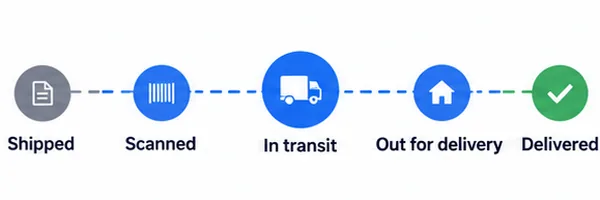
As soon as the seller ships, a tracking number is created, and that code is the key to every detail about the delivery.
It normally reaches you by email or sits on your order page. Save it somewhere handy, since you will come back to it more than once.
Finding the tracking number
Nothing happens without the code, so start by hunting it down here:
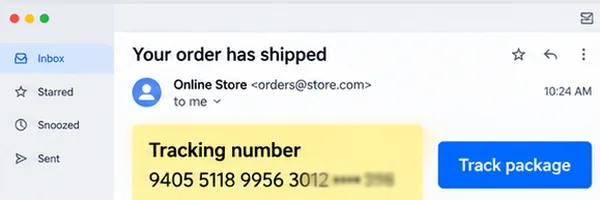
- In the confirmation email that followed your purchase
- Inside your order history after logging into the store
- A tab labeled “Shipping” or “Track Order” on the store page
- On the shipping label, when the box is already in your hands
Amazon purchases show the code right in the order details. Other stores usually email it within 24 hours of shipping.
Tracking with UPS
UPS keeps tracking about as easy as it gets. The number plus the UPS site or app is all it takes.
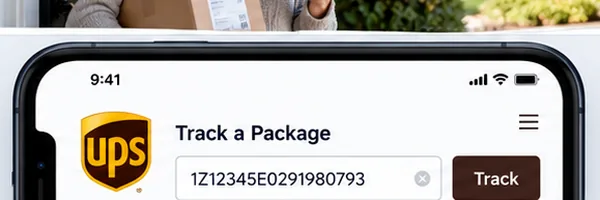
1Open ups.com
Point your browser at ups.com, or get the UPS Mobile app, free on Android and iPhone.
2Locate the tracking field
The homepage carries a box marked “Track” or “Track a Package”, usually right up top.
3Type the number in
Paste your UPS tracking number, which is 18 characters long and nearly always begins with 1Z, then press “Track”.
4Read the result
UPS displays where the parcel is now, the delivery date it expects and every scan recorded along the way.
Open a free UPS My Choice account and alerts by text and email arrive at every stage.
Tracking with FedEx
FedEx works much the same way, and both its website and app are easy to follow even the first time.
1Head to fedex.com
Visit fedex.com, or install the FedEx Mobile app, which costs nothing and runs on any handset.
2Choose “Track”
Along the top runs a “Track” menu; open it and pick “Track a Package”.
3Enter the FedEx number
Drop in the FedEx tracking number, normally 12 or 15 digits long, then hit “Track” for the status.
4Follow the map and timeline
A live map and the complete shipment timeline appear on screen, and you can enable notifications by email or SMS so nothing slips by.
Away on delivery day? The free FedEx Delivery Manager, set up on the FedEx site, lets you pick another time or address.
Tracking with USPS
Most USPS services carry tracking, including Certified Mail, Priority Mail and First-Class Package. Some plain letters and flats are untracked, so check the receipt first.
- Head to usps.com and choose “Track a Package” from the top menu
- Enter your USPS tracking number, which runs about 22 digits
- Press “Track” to see where the parcel is at the moment
- Or text the number to 28777 (2USPS) and receive the status by text message
USPS additionally offers Informed Delivery at no charge: register on its site and a daily email previews the letters coming your way and reports on parcels ahead of arrival.
Status frozen for over 5 business days? usps.com lets you open a Missing Mail search request.
Why tracking your package matters
- You know the exact delivery date before it happens, so you can be home or arrange a safe drop-off spot.
- USPS, UPS, FedEx, and Amazon all offer real-time updates, meaning the status refreshes as the package moves through each facility.
- If a delay or exception appears in the tracking system, you can call the carrier right away instead of waiting days wondering what happened.
- Most carriers let you redirect a package to a different address or a pickup location before final delivery, for free, directly in the tracking page.
- Tracking gives you proof of delivery with a timestamp and, on UPS and FedEx, a photo of where the driver left the package.
Tracking an Amazon order
Amazon is the easiest of the four: everything happens in the account you log into anyway.
- Log into the Amazon app or website
- Open “Returns and Orders”, top right of the screen
- Select the order and tap “Track Package”
- You get the parcel’s present position, a delivery window, and in some cases a live map once the driver is nearby
Emails and push notifications fire on their own the moment a parcel goes out for delivery, and an Alexa device, Amazon’s voice assistant, answers if you ask it where the package is.
Shipments handled by third-party sellers often run on a UPS, FedEx, or USPS code, and Amazon tends to show that link on the order page itself.
What the status messages mean
The vocabulary on tracking pages trips people up. The plain translation:
When tracking stops updating
Days can pass with the page frozen on one line, and that alone proves nothing is broken.
Before you worry, try this:
- Allow a full day after the latest scan; stops without a scan are common, particularly on weekends.
- Reload the page and wipe the browser cache, because stale data occasionally hides the latest update.
- Read the service notices. Both carriers post warnings on their sites whenever a storm or a national holiday is delaying deliveries.
- Start with the seller. Retailers frequently have information the public page does not display.
- Get the carrier on the line after 7 business days of silence. FedEx: 1-800-463-3339. USPS: 1-800-275-8777. UPS: 1-800-742-5877.
Attention: “Delivered” on screen with no box at the door? Knock on a neighbor’s door and check the front desk before you call anyone; more often than not the parcel is a few steps away.
Free apps that track every carrier in one place
Orders from a handful of stores at the same time? A package tracker app pools them. Drop in any code, from any carrier, and the whole set of shipments lines up on one screen.

Reliable free options include:
- AfterShip: Android, iPhone and web, with support for over 900 carriers worldwide and push notifications for every status change.
- 17TRACK: a website and an app, and the one to use for anything crossing a border, with coverage of shipments out of China, Canada, the UK and beyond alongside the main US carriers.
- Deliveries (by Junecloud): made for Mac and iPhone, gathering Amazon, USPS, FedEx, UPS and dozens more carriers into one tidy list.
- Parcels: built for Apple Watch and iPhone, clean to use, and it recognizes the carrier by itself once a code is pasted.
None of them charge for basic use. Sign in, paste your numbers and let the app notify you, with no need to visit each carrier’s site separately.
Common tracking mistakes
Tiny slips turn a simple check into a headache. Watch for these:
Frequently asked questions
Your tracking number is in the shipping confirmation email the store sent you. It is also in your order history on the store's website or app, usually right next to the order status. Copy that number exactly, including all letters and digits.
In transit means your package has left the origin facility and is moving through the carrier's network toward the destination. It has not arrived at the final delivery hub yet. This status can last anywhere from one day to several days depending on the shipping method and distance.
Tracking information usually takes 12 to 24 hours to appear after the seller ships the order. If it still shows nothing after 24 hours, double-check that you copied the full number without spaces. If the problem continues, contact the store first, since they have the carrier receipt.
Yes, on Amazon you can track any order directly in the app or website under Your Orders, even without a separate tracking number. For other carriers, you need the tracking number, so check your confirmation email or the store's order history page.
All three show real-time location updates, but FedEx and UPS also show a delivery photo and let you change the delivery address or hold the package at a local store or locker. USPS tracking is free and works on usps.com, while UPS uses ups.com and FedEx uses fedex.com.
Package tracking for every case
Knowing how to track a package spares you hours, phone calls and worry. Whether the carrier is UPS, FedEx, USPS or Amazon, the drill barely changes: get the code, go to the carrier’s site, type it in.
Activate the free alerts every carrier provides and your phone reports each change as it happens, so guessing where a delivery is ends for good.
Important: This article is independent and for informational purposes only. Neither Amazon, USPS, FedEx, UPS nor any other carrier or platform mentioned sponsors, controls or is affiliated with it. Official details come from the carrier itself.