The Lifeline Program is a federal benefit that helps low-income Americans pay for phone or internet service. Some providers in the program offer free or heavily discounted smartphones, and in rare cases, high-end devices like the iPhone 16 Pro may be available through trade-in or upgrade options tied to Lifeline plans.
Every month, the federal Lifeline Program shaves money off the phone bill of American households on a low income.
Qualify and that credit goes into a phone plan, and on certain offers a handset is part of the package.
The Lifeline Program, defined
Lifeline is a federal benefit supervised by the FCC, the agency responsible for communications across the United States.
Qualifying households keep up to $9.25 per month of what they would pay for phone or internet, and on Tribal lands the figure climbs to $34.25 per month.
The whole bill is not covered; the monthly amount simply gets smaller. Some providers turn that discount into a plan that costs nothing or close to it, and a few bundle in a basic smartphone.
The program was born in 1985 to cover landlines. Mobile phones and broadband internet were added later and are covered today.
Is the iPhone 16 Pro covered by Lifeline
Plainly put: right now there is no Lifeline provider giving the iPhone 16 Pro away under the program.
The iPhone 16 Pro sells for about $999. Providers add a phone to attract new customers, but they keep that cost low, so what they give away is a budget Android handset, never a flagship iPhone.
Access Wireless, SafeLink Wireless, enTouch Wireless and Q Link Wireless are among the best-known Lifeline carriers, and an iPhone 16 Pro is missing from every one of their free lineups.
The usual handout is a basic Android handset carrying the Motorola or Alcatel name, or one of Samsung’s budget models. Calls, texts and basic apps all run without trouble on them.
Attention: A free iPhone 16 Pro promised in the name of a government program is almost always a scam. Check the FCC’s site, fcc.gov, or usac.org before you give personal details to any company.
Who can get Lifeline
Income or participation in a qualifying government program: meeting one of the two is enough.
Income route: household earnings cannot exceed 135% of the Federal Poverty Guidelines. Translated into dollars: roughly $20,331 a year for one person, or about $41,625 for a four-person family.
Program route: you, or someone living with you, is enrolled in at least one of these:
- SNAP (food stamps)
- Federal Public Housing Assistance
- Medicaid
- Tribal programs (for residents of Tribal lands)
- Veterans Pension and Survivors Benefit
- Supplemental Security Income (SSI)
Households, not people, are counted: one Lifeline benefit per home, with a home defined as everyone who shares the address and the bills.
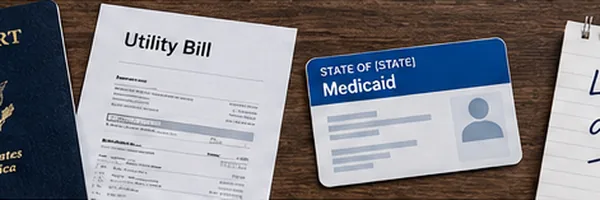
Documents to prepare first
Having the paperwork ready saves real time, and a missing or unclear file can get the application rejected.
The Lifeline application, one step at a time
Two doors are open: the National Verifier on the web, or a Lifeline provider directly. Either works, and the online path described here is faster.
1Open the National Verifier
Go to nv.usac.org, the official government site, and choose “Apply Now.” Create a free account with your email address.
2Enter your details
Fill in your name and address, when you were born, and 4 digits from your Social Security Number; the system attempts to verify you automatically.
3Upload proof if the system asks
When automatic verification fails, you will be asked for documents. Take a clear photo of each one with your phone; files must be sharp and readable.
4Wait for the decision
With clear documents, approval often takes a few minutes. Some cases run to 7 business days. A confirmation email follows either way.
5Select a Lifeline provider
Approved? Head back to usac.org, where the provider finder takes your zip code to see the companies serving your area and compare data, minutes and device options.
6Enroll with that provider
Call the company or sign up on its site, quoting your Lifeline approval ID. The plan is switched on and any free handset is posted to you.
Why getting an iPhone 16 Pro through Lifeline is worth knowing about
- Lifeline covers up to $9.25 per month off your phone or internet bill, which can offset the cost of a plan that comes with a device upgrade option.
- Qualifying households on Medicaid, SNAP, SSI, or with income at or below 135% of the Federal Poverty Guidelines can apply at no cost through approved providers.
- Some Lifeline providers like TruConnect and Cintex Wireless offer free Android phones, and pairing that benefit with a trade-in program can open the door to iPhones.
- The Affordable Connectivity Program (ACP) used to add up to $30 more per month, meaning stacked benefits helped many households afford better devices before ACP ended in June 2024.
- Applying is fully free and takes about 10 to 15 minutes online through USAC's National Verifier at lifelinesupport.org, with no credit check required.
Which phones Lifeline actually offers
Providers refresh their device lists all the time, but what they hand out tends to fall into a few predictable categories.
Here is what the main providers realistically supply:
Free iPhones, of any generation, do not exist in the program. An unlocked iPhone you already own is another story: most carriers will put it on their free SIM plan, and that is as near as an iPhone gets to Lifeline.
Using your own iPhone 16 Pro on Lifeline
Yes, and it is by far the most practical route.
Own an unlocked iPhone 16 Pro, meaning one not tied to a specific carrier, and any Lifeline provider with a BYOD option (Bring Your Own Device) can take it on.
Q Link Wireless and SafeLink Wireless both allow BYOD on compatible networks. Apply for the benefit, get approved, request a SIM card from the provider, and your service is activated on the iPhone you already have.
That leaves you paying nothing, or close to nothing, for the monthly plan while keeping the phone you like.
To check whether your iPhone 16 Pro is unlocked, open Settings, tap General, then About, and find “Carrier Lock.” A “No SIM restrictions” line means the handset is free to move.
Errors that delay or sink an application
Many applicants get stuck or refused over small, avoidable things. Knowing them ahead of time saves days of waiting.
- Uploading document photos so fuzzy or cropped that nobody can read them
- Signing with a company whose coverage is weak where you live, then being surprised by bad service
- Not telling your provider when you move to another state
- Filing from a home where another resident already holds the benefit
- Entering a P.O. Box where your physical street address belongs
- Forgetting the yearly recertification, which cancels the benefit automatically
That last point deserves emphasis. USAC sends a recertification notice every year. Ignore it and the benefit is cut off; confirming online that you still qualify takes about five minutes.
If you are denied
A denial is rarely final. The usual cause is a document problem rather than genuine ineligibility.
The reason comes from USAC by letter or email and deserves a close read; usually a fresh application can go in the moment the problem is corrected.
Convinced the decision was a mistake? An appeal is your right, with the process described on the USAC website, and the free line 1-800-234-9473 can explain what happened.
Important: This article is independent and for information only. None of the companies or programs mentioned, Q Link, SafeLink, USAC and the FCC included, sponsors or controls it, and there is no affiliation between them and this page. Official answers come straight from the agencies.
Frequently asked questions
Not directly. Lifeline provides a monthly discount on service, not a free flagship phone. The iPhone 16 Pro retails for $999 or more. However, some carriers let you apply your Lifeline discount to a plan that includes device financing or trade-in credit, which can significantly lower your out-of-pocket cost.
You qualify if your household income is at or below 135% of the Federal Poverty Guidelines, or if someone in your home participates in Medicaid, SNAP, SSI, Federal Public Housing Assistance, or Veterans Pension and Survivors Benefit. Only one Lifeline benefit is allowed per household.
Approved Lifeline providers include TruConnect, Cintex Wireless, Assurance Wireless, and SafeLink Wireless, among others. Most offer free basic Android phones with qualifying plans. For an iPhone 16 Pro specifically, you would need to check carriers like AT&T, T-Mobile, or Verizon that accept Lifeline discounts and also run trade-in or installment programs.
Go to lifelinesupport.org and click 'Apply Now.' You will need to verify your identity and prove eligibility with documents like a benefits letter or income statement. Once approved, you choose a participating provider in your state. The whole process usually takes less than 15 minutes.
The ACP ended in June 2024 after Congress did not renew its funding. It used to add up to $30 per month on top of Lifeline, helping households afford better service and devices. Lifeline itself is still active and continues to provide the $9.25 monthly discount through USAC-approved providers.
The short version
Households earning little have, in Lifeline, a legitimate way to trim the phone bill: as much as $9.25 off each month, plus a simple free handset at certain providers.
Lifeline does not hand out the iPhone 16 Pro. If you already own an unlocked one, though, a Lifeline carrier can serve it for almost nothing each month, a benefit worth claiming.
Get your documents together, apply at nv.usac.org, pick a provider serving your area and never miss the annual renewal. Qualify and renew, and the benefit remains yours.